Yes — provided the element that comes back is the same element, not a replacement. That sentence is the whole subject, and it is the part most “send to Revit®” tools get wrong.
The rule Revit applies
Revit annotations do not store geometry. A dimension stores references to the faces or planes it measures; a tag stores a reference to the element it labels. When the referenced element is deleted, Revit deletes the dimension and the tag with it — silently, in the same transaction, with no undo once the update is committed.
So the question “do my dimensions survive an update?” has nothing to do with how good the new geometry is. It has one answer: did the update keep the ElementId, or did it hand you a new one?
What most tools do
From the issue tracker of a widely used open-source connector, describing its own Revit receiver:
Our Update method deletes all the received geometry and creates new ones in their place, instead of updating unchanged parts and creating only the changed parts.
GitHub: speckle-sharp issue 1674
Delete and recreate. Every receive is a fresh element with a fresh ElementId; every dimension and tag placed on the previous one is gone. Users on the same project’s forum ask why they cannot dimension the received generic models at all — and the answer there is that Revit cannot dimension mesh geometry created through the API. Two separate walls: the first stops you placing the dimension, the second removes it on the next update.
Speckle Community: Cannot dimension generic models brought into Revit
The same rule, in the other direction, is the reason 3ds Max® artists lose modifiers and UVW when a Revit File Link reloads: the object the modifier was attached to has been replaced by one that merely looks the same. Identity is the whole game, on both sides of the bridge. Why that happens on the 3ds Max side.
What Levlin Bridge does on the second pull
It updates the existing Mass family in place. The family is rebuilt from the new 3ds Max geometry; the element in the project is not deleted and not replaced. Measured, in order:
| Step | What happened |
|---|---|
| First pull | One element, category Mass, ElementId recorded |
| Dimensions placed on it | Against solid faces and the generated reference planes |
| Geometry changed in 3ds Max, pulled again | Same ElementId before and after |
| Dimensions | Still present, still attached |
That is the only mechanism by which an annotation can survive an update, and it is the one this tool uses.
The run these two frames come from
On 22 September 2026 a dimension string was placed in Revit on a Mass that had arrived from 3ds Max. The same object was then edited in 3ds Max, pushed on its own, and pulled again. Both frames are the same view, minutes apart.
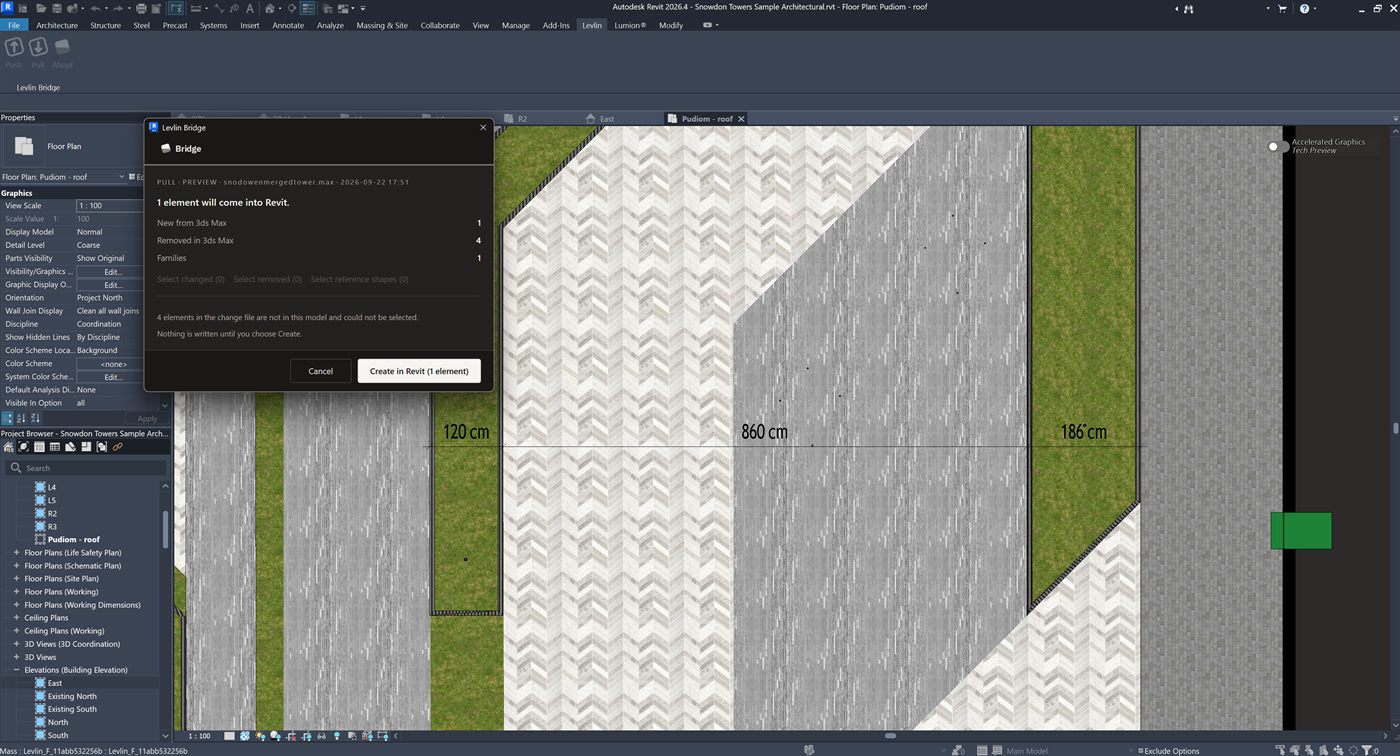
Mass : Levlin_F_11abb532256b. The preview offers one element.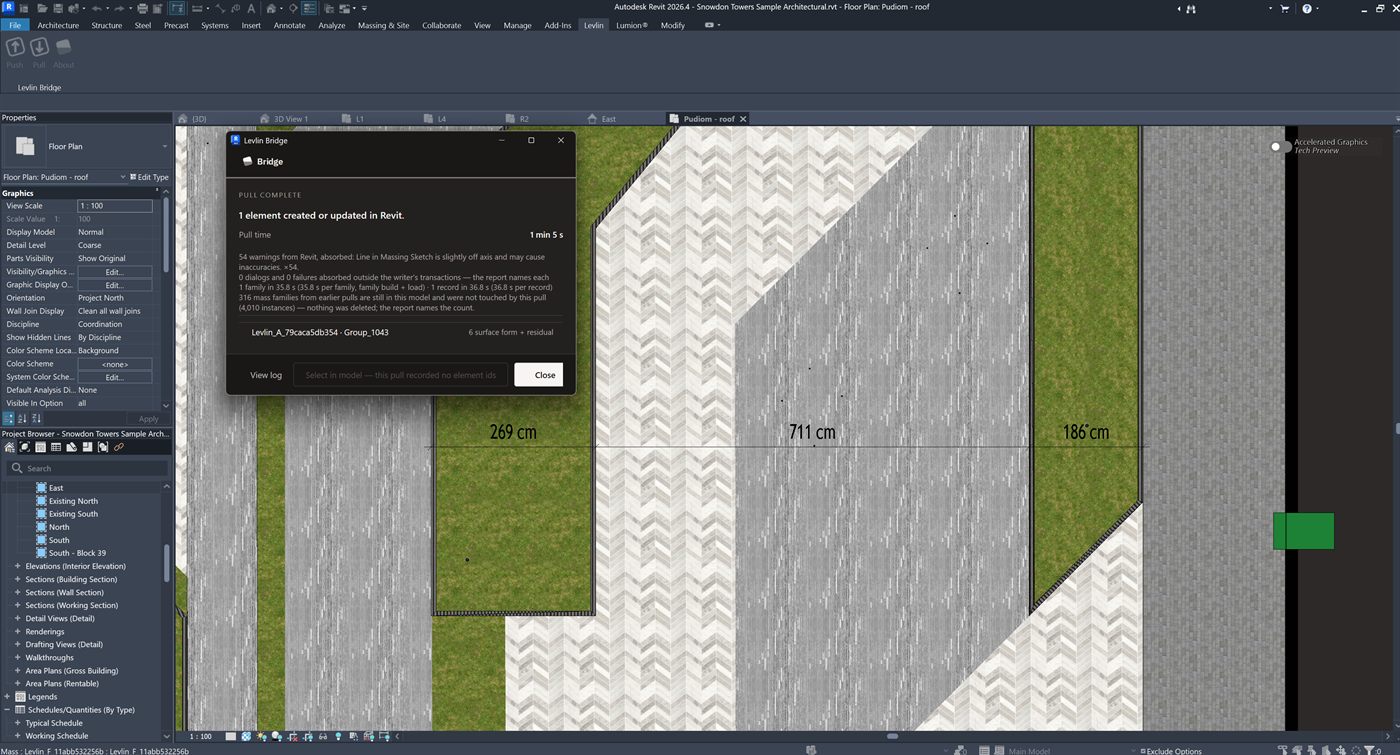
Levlin_F_11abb532256b. The edge moved 149 cm in 3ds Max; both dimensions re-measured and their total is unchanged at 980 cm. The third, on a face that did not move, is still 186 cm.The dialog in the second frame also states what the pull left alone: 316 mass families from earlier pulls are still in this model and were not touched by this pull (4,010 instances). One family was rebuilt. Nothing was deleted.
What can still move
A dimension survives because its reference survives. If the face it measured has moved, the dimension now reports the new distance — which is what you want. If the face it measured no longer exists in the new geometry (you deleted that part of the model in 3ds Max), Revit removes that one dimension, exactly as it would for any native family whose sketch you edited. The element and every other annotation on it stay.
The honest boundary
The measured case is dimensions on the returned Mass, across a geometry change, in Revit 2026 with 3ds Max 2024. One boundary from the same runs, stated plainly: instances placed from a shared shape — the tilted and floored ones, 13 of 4,024 in the larger run — are replaced on a re-pull rather than kept. The pull also took 1 min 5 s for that single object, 35.8 s of it building a family of 156 surface forms. We publish the case we ran and we say which one it was. Why the returned element is a Mass family in the first place.
Frequently asked
Why do my dimensions disappear when another tool updates the geometry?
Because that tool deleted the element and created a new one. A dimension references an element by identity; when the element is deleted, Revit removes the dimension in the same transaction.
Does Levlin Bridge delete and recreate the Mass on a second pull?
No. It updates the existing family in place. The ElementId is the same before and after the pull, which is why dimensions and tags placed on the first pull remain.
What happens to a dimension on a face that moved in 3ds Max?
It stays and reports the new distance. Only a dimension whose reference no longer exists in the new geometry is removed, as with any native family.
Do tags survive as well as dimensions?
A tag references the element, and the element is the same one: the run report states the ElementId is unchanged. The screenshots on this page record the dimensions across the change; a tag is not in frame in them.
Is this the same reason modifiers break on a Revit File Link reload in 3ds Max?
Yes, in reverse. A reload that replaces an object breaks everything attached to it. Work survives an update only when the thing it is attached to keeps its identity.
Does the Mass family get replaced when I pull again?
No. In the run published above the Revit status bar named the same family, Levlin_F_11abb532256b, before the pull and after it. The family definition is rebuilt inside the family that is already standing, so the family, its instances and their ElementIds are not deleted and not recreated.
Do the dimension values update when the geometry changes?
Yes, and that is the point. In the measured run two dimensions on one string read 120 cm and 860 cm before the pull and 269 cm and 711 cm after it, because the edge between them had moved 149 cm in 3ds Max. Their total was 980 cm before and 980 cm after, and a third dimension on a face that did not move still read 186 cm.
What happens to the rest of the model when I pull one changed object?
Nothing. The pull in the measured run rebuilt one family and reported that 316 mass families from earlier pulls were still in the model and were not touched by it, carrying 4,010 instances. Nothing was deleted.
Can I push a single object from 3ds Max instead of the whole scene?
Yes. In the measured run one selected object was pushed in 1.3 seconds as a 34 KB change file, and its identity key was kept from the scene rather than minted new, which is why Revit recognised it as the object that was already there.
What if I detach one instance in 3ds Max and edit it on its own?
It comes back as its own Mass family, and the family it was an instance of is left standing and untouched. A separated object no longer matches the family it came from, so it is built beside it rather than changing every other instance.
How long does a second pull of one object take?
One minute five seconds in the measured run, of which 35.8 seconds was building a family of 156 surface forms. A single object is not instant; a rebuilt family is real work, and we publish the time we measured rather than a rounded claim.
Related field notes
- How to get a 3ds Max model into Revit as a Mass family
- Which 3ds Max import formats can travel on to Revit?
- Blender to Revit: the FBX, OBJ, glTF and USD route through 3ds Max
- Rhino and Grasshopper geometry into Revit through 3ds Max
- How to get a SketchUp model into Revit as measurable elements
- Flat faces vs curved surfaces: what comes back from 3ds Max as a solid Mass, and what stays a mesh
- What can an architect do with a Mass that came back from 3ds Max?
- Why Levlin Bridge returns 3ds Max geometry to Revit as a Mass family, not a DirectShape
- Is there a plug-in that links Revit and 3ds Max in both directions?
- Why the Revit model arrives at the wrong scale in 3ds Max
- Why the Revit model appears twice in 3ds Max after a reload
- 3ds Max cannot link the Revit file? Four causes, in order
- Revit File Link or FBX for 3ds Max?
- Do Revit and 3ds Max versions have to match?
- What happens to deleted Revit elements in 3ds Max?
- Why modifiers and UVW break when a Revit link reloads
- What Combine By Revit Material actually does to your model
- Why “Keep material parameters on reload” doesn’t save your 3ds Max materials
- Does Datasmith move a Revit model into 3ds Max?
- Can Speckle sync Revit and 3ds Max?
- Is NVIDIA Omniverse still a Revit to 3ds Max route in 2026?
Levlin Bridge
Levlin Bridge is a Windows plug-in that moves geometry between Autodesk Revit and Autodesk 3ds Max in both directions. Push the model from Revit, pull it into 3ds Max, and push the geometry you changed back into Revit as real elements. Only the difference ever moves, so materials, modifiers and UVW stay exactly where you left them. Any Revit 2022–2027 works with any 3ds Max 2024–2027.
Levlin Bridge is in final testing and is not released. There is nothing to download yet. Leave your email and you get the 30-day trial the day it ships.