The fastest way to drop geometry from another application into Revit® is a DirectShape. It is also the reason so many “send to Revit” workflows end with the same four complaints: it does not appear in your schedules, Wall by Face refuses to see it, there is no family around it to dimension to, and on the common routes every update deletes it and creates a new one, taking your dimensions and tags with it.
Levlin Bridge never places a bare DirectShape in a project. Every object comes back inside a Mass family. Where a mesh is too dense to rebuild as forms, it is kept as a DirectShape inside that family, grounded on the family’s reference planes — so it can still be dimensioned, and a re-pull updates it in place. This note explains why the container matters, using the words of the people who hit the wall first.
What users say about DirectShape
From a Rhino.Inside user trying to build walls on a mass he had just sent into Revit:
the wall by face command is not allowing me to select any surfaces
The reply from the McNeel team is the whole story in one line:
DirectShapes aren’t “Real” Revit families and are not eligible for Hosting
McNeel forum: Mass created by DirectShape not allowing Wall by Face
Another user abandoned the DirectShape route for the same reason — it “wouldn’t let me pick walls by face” — and moved to building a family per mass by hand, then found he had to “manually locate the family in the project by aligning it with something, which is annoying”.
McNeel forum: How to simplify Brep to Revit Mass transfer
Two more, from separate threads. A user importing manufacturing models could not dimension them once they arrived; the answer was that Revit cannot dimension mesh geometry created through the API, and the fix was to send solids instead. Another asked why “the directshape geometry is not showing in the Revit’s project browser, nor schedules”.
Speckle Community: Cannot dimension generic models brought into Revit
McNeel forum: DirectShape not showing up in Revit schedules
And the one that costs the most hours, from an open-source connector’s own issue tracker:
Our Update method deletes all the received geometry and creates new ones in their place, instead of updating unchanged parts and creating only the changed parts.
GitHub: speckle-sharp issue 1674
Delete and recreate means a new ElementId. A new ElementId means every dimension, tag and constraint that referenced the old element is gone. Autodesk’s own developer material describes DirectShape as a lightweight container, and the Rhino.Inside documentation positions it for temporary drawing sets such as competitions and early design presentations. Dropped bare into a project, that is the honest job description.
The Building Coder: DirectShape topics
What users say about Mass families
Ask the same forums how to get 3ds Max® geometry into Revit for real work and the answer has been the same for fifteen years: export it, then import it into a Mass family. “A SAT export will bring in the geometry as one piece in the conceptual mass environment, and in the project you will be able to create walls by face.” Autodesk’s own help documents exactly this route.
RevitForum: 3ds Max to Revit massing and Wall by Face
Autodesk Help: Import a design to a Mass family
The Mass family is the container Revit designed for foreign geometry. Wall by Face, Floor by Face, Roof by Face and Curtain System by Face work on it. Mass Floors compute gross area per level from it. It schedules. It cuts in plan and section. It can be dimensioned, aligned and tagged — provided the geometry inside it is a solid with real faces.
Which is where the manual route breaks down. From an Autodesk forum thread on importing from 3ds Max: “the geometry that you can import into Revit from Max is always seen as a mesh not a solid”. A mesh inside a Mass family is still a mesh. Faces cannot be picked, floors cannot be computed, and the advice becomes “use solids from Max instead of polys” — which is not how 3ds Max geometry exists.
Autodesk Community: Import from 3ds Max to Revit
What Levlin Bridge returns
One element, category Mass, containing:
| Part | What it is | What you can do with it |
|---|---|---|
| Solid forms | Every planar region of the 3ds Max mesh, rebuilt as a solid with real faces; cylinders detected and rebuilt as cylindrical faces | Dimension, align, tag, Wall by Face, Floor by Face, Mass Floors |
| Mesh residual | Curved or irregular geometry that cannot be expressed as a solid face, kept inside the same family | Visible, cuts in plan and section, positioned exactly |
| Ten reference planes | Bounding-box extents, the three centre axes, and the plane that defines the family origin — generated with the family | Dimension and align even the mesh part |
The whole family lands at the correct position and scale, so there is no “aligning it with something”.
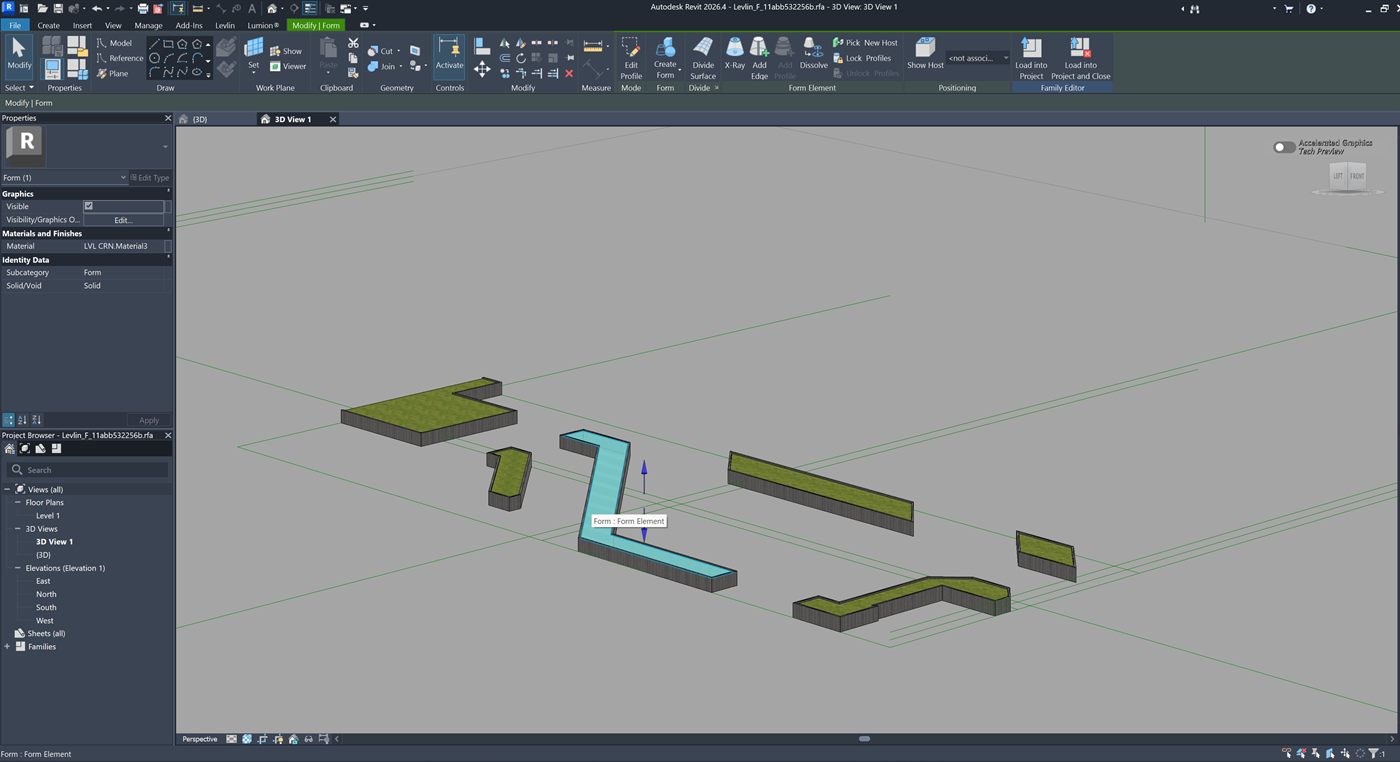
Levlin_F_11abb532256b.rfa, opened in Revit 2026.4 on 22 September 2026. It is a real family document with its own views, and the ribbon shows the Family Editor’s Load into Project. The selected element is a Form, Solid/Void reads Solid, and the Material field carries the material that came back with it. The green lines are the reference planes generated with the family. None of this exists in a DirectShape.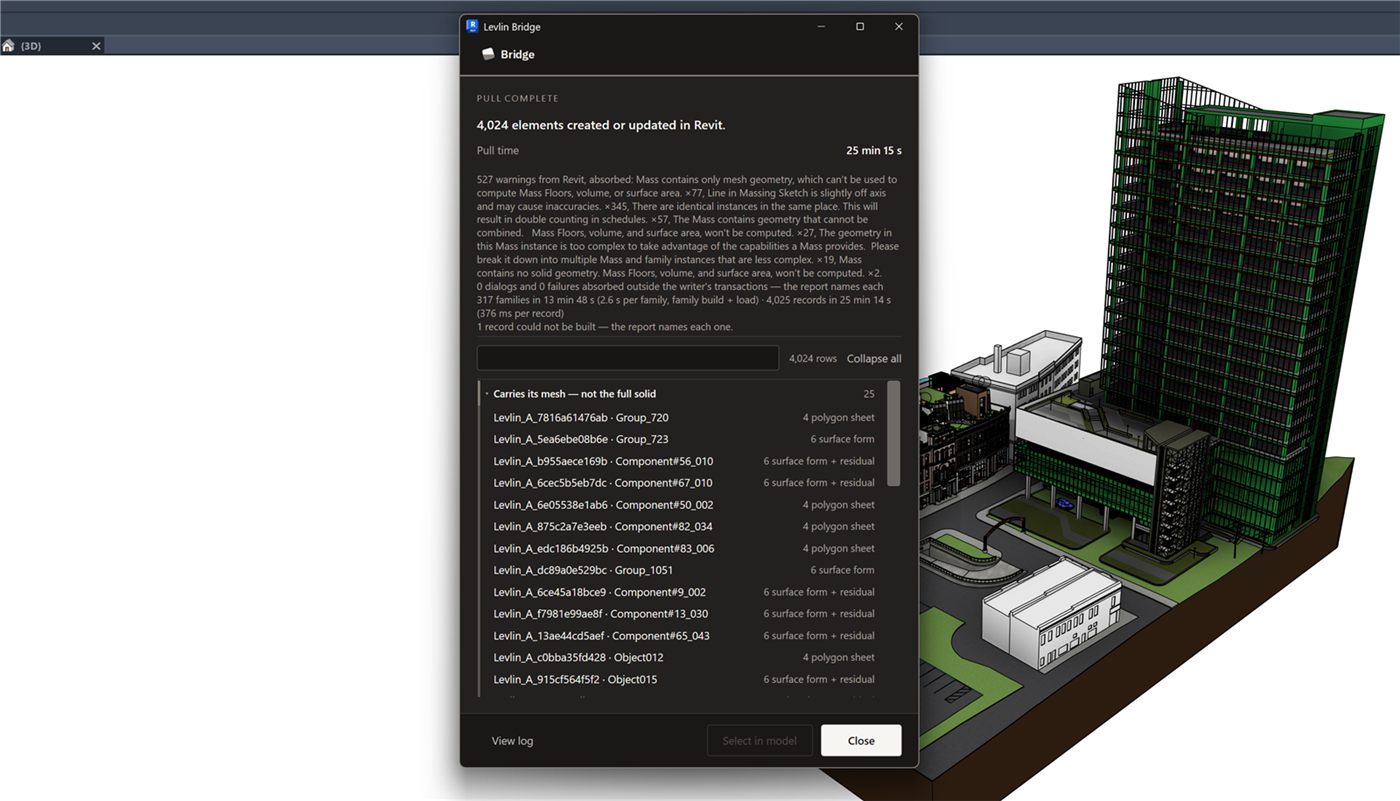
Why the ElementId matters more than the geometry
When you pull again after changes in 3ds Max, Levlin Bridge updates the existing family. It does not delete it and create a new one. The ElementId is the same before and after, which is the only reason dimensions and tags placed on the first pull are still there after the tenth. This is the difference between a transfer and a workflow, and it is measured, not assumed.
The honest boundary
Not every surface comes back solid. Flat and cylindrical geometry does. Freeform curved surfaces that 3ds Max stores as dense triangle meshes stay as the mesh residual inside the same family — still positioned, still visible, still dimensionable through the reference planes, but not a face you can host a wall on. On a large model Revit may show its “Mass too complex” warning; the family is still created. Everything above was measured live in Revit 2026 and 3ds Max 2024, and we say so rather than implying a wider matrix we have not run.
Frequently asked
Can I use Wall by Face on geometry returned by Levlin Bridge?
Yes, on the solid faces. Flat and cylindrical regions of the 3ds Max mesh come back as solid forms inside a Mass family, and Revit’s By Face tools accept them. Geometry that stays as the mesh residual is not a hostable face.
Can a DirectShape be dimensioned?
Bare in a project, a DirectShape arrives with no family around it and nothing to dimension to. Inside a Mass family it is a different object: it sits on the family’s reference planes, and those are what a dimension attaches to. That is how Levlin Bridge returns very dense meshes.
Do my dimensions and tags survive when I pull again from 3ds Max?
Yes. Levlin Bridge updates the existing Mass family in place rather than deleting and recreating it, so the ElementId is unchanged and annotations that reference it remain.
Does the returned Mass work with Mass Floors and schedules?
Yes where the family carries solid forms, including when it also holds a mesh residual, and the element appears in Mass schedules. Two boundaries the recorded run shows on its own face: a family that carries only mesh and no solid form is flagged by Revit as mesh-only, 77 of 4,024; and where 3ds Max holds identical objects in the same place, Revit warns they may be counted twice in a schedule, 57 of 4,024.
What comes back as a mesh instead of a solid?
Freeform curved surfaces that exist in 3ds Max only as dense triangle meshes. They are kept inside the same family, positioned and visible, and can be dimensioned through the ten reference planes, but they are not faces you can host on.
Is this the same as importing a SAT file into a Mass family by hand?
It reaches the same container, without the export, the import, the manual alignment, and without the geometry arriving as a mesh. And unlike a manual re-import, a second pull updates the same element instead of replacing it.
Related field notes
- How to get a 3ds Max model into Revit as a Mass family
- Which 3ds Max import formats can travel on to Revit?
- Blender to Revit: the FBX, OBJ, glTF and USD route through 3ds Max
- Rhino and Grasshopper geometry into Revit through 3ds Max
- How to get a SketchUp model into Revit as measurable elements
- Flat faces vs curved surfaces: what comes back from 3ds Max as a solid Mass, and what stays a mesh
- What can an architect do with a Mass that came back from 3ds Max?
- Do dimensions and tags survive when you pull again from 3ds Max into Revit?
- Is there a plug-in that links Revit and 3ds Max in both directions?
- Why the Revit model arrives at the wrong scale in 3ds Max
- Why the Revit model appears twice in 3ds Max after a reload
- 3ds Max cannot link the Revit file? Four causes, in order
- Revit File Link or FBX for 3ds Max?
- Do Revit and 3ds Max versions have to match?
- What happens to deleted Revit elements in 3ds Max?
- Why modifiers and UVW break when a Revit link reloads
- What Combine By Revit Material actually does to your model
- Why “Keep material parameters on reload” doesn’t save your 3ds Max materials
- Does Datasmith move a Revit model into 3ds Max?
- Can Speckle sync Revit and 3ds Max?
- Is NVIDIA Omniverse still a Revit to 3ds Max route in 2026?
Levlin Bridge
Levlin Bridge is a Windows plug-in that moves geometry between Autodesk Revit and Autodesk 3ds Max in both directions. Push the model from Revit, pull it into 3ds Max, and push the geometry you changed back into Revit as real elements. Only the difference ever moves, so materials, modifiers and UVW stay exactly where you left them. Any Revit 2022–2027 works with any 3ds Max 2024–2027.
Levlin Bridge is in final testing and is not released. There is nothing to download yet. Leave your email and you get the 30-day trial the day it ships.