There are two routes. Autodesk’s route is free, in the box and documented: export the object from 3ds Max® as SAT or DWG, import the file into a Mass family, load the family into the project. It works within limits that Autodesk states itself. The second route is Levlin Bridge, a plug-in for both applications, which rebuilds each 3ds Max object as a Mass family with real faces and updates it in place on the next pull. This note walks through both, with what Autodesk says and what users report, so you can choose the one that fits the job.
Route 1: Autodesk’s route, as documented
- In 3ds Max, select the objects and use Export Selected as SAT (for solids) or DWG. Check the units in the export dialog.
- In Revit®, start a new family from the Conceptual Mass template (or a new in-place Mass in the project).
- Insert > Import CAD, choose the file, set the import units and positioning.
- Load the family into the project and place it.
- Where the geometry allows, use Wall by Face, Roof by Face, Floor by Face and Mass Floors on it.
For a simple volume that will be imported once, this is all you need, and it costs nothing.
What Autodesk says about it
Autodesk’s own pages carry the limits in plain words. On importing massing studies: “Exported objects are faceted, rather than smooth. When exported, curved elements may be triangulated.” On imported geometry in Mass families: “in some cases, imported geometry is not well suited to mass instances” — “cornices, reveals, windows, casework, tessellated approximations” of curved surfaces “can fail to produce meaningful host elements and may produce errors”; “Some CAD formats lack geometry suitable for computing volumetric information and mass floors, resulting in errors and warnings”; and “Avoid complex geometry in mass instances” because it “can slow down processing considerably”.
The support article on exporting from 3ds Max to Revit, updated in April 2025, is shorter still: “3ds Max does not create family data for Revit.” Materials, it explains, are assigned afterwards by DWG layer, by hand, under Manage > Object Styles > Imported Objects. And a separate article records that “some SAT files that contain surface bodies cannot be imported” — Revit reports “Imported Model is empty”.
Autodesk Help: Importing Massing Studies
Autodesk Help: About Imported Geometry in Mass or Generic Model Families
Autodesk Support: How to export objects from 3ds Max into Revit
Autodesk Support: Imported Model is empty when importing a SAT file in Revit
What users report
The forum threads on this route go back more than a decade and say the same things. On the Autodesk forum in 2018: “revit picks ups every single traingle face instead the whole shape … I have imported it as Sat and dwg and neither worked!!” On RevitForum in 2013, a user trying Wall by Face on an imported 3ds Max mass found “about 20% of all the faces i imported are completely inactive”, concluded that “Revit doesn’t work well with mesh models”, and reported that the Body Object workaround “can only be used on basic shapes” and that “the body objects intersect with each other, which later in revit makes it impossible to make floors, saying ‘massing floors cannot create extrusion’”. In 2012, another: “i cant create floors with this object”, and the families that did import were “very heavy … 20 times larger” than a native one. The best-known blog guide to the route advises keeping the export under 32,000 faces, hiding edges, saving as DXF 2007, and warns: “You may experience some geometry issues through this multi-handling of the data”.
Autodesk Community: Import from 3ds Max to Revit (2018)
RevitForum: 3ds Max to Revit massing, Wall by Face (2013)
RevitForum: Using 3ds Max objects as a Mass in Revit (2012)
What Revit Wants: Use 3ds Max to prepare geometry for Revit (2013)
Why the complaints, if the route is documented
Because it is a file import, not a conversion. A 3ds Max object is a polygon mesh, and a mesh written to SAT or DWG is still a mesh: every triangle arrives as its own face, and a curved wall arrives as a fan of facets. Revit’s host-by-face tools want one face per surface, which is why some faces are “inactive” and Mass Floors fail. The Body Object workaround in 3ds Max gives real solids only for primitives, and those solids intersect rather than join. There is no update path: a change in 3ds Max means a new export, a new import and a new element, and everything placed on the old one is gone. The whole file is one block, whatever it contained. Units and position are set by hand on every import. And materials, when they can be carried at all, are matched by DWG layer after the fact. None of this is a defect in Revit; it is what importing a file is. Within Autodesk’s own limits — a simple volume, imported once — the route holds.
Route 2: Levlin Bridge
- Pull once from the Revit project you will rebuild in — any element. This sets the 3ds Max units to that project; Before it, Levlin Bridge refuses every object in a push, so nothing travels. Why units go wrong otherwise.
- In 3ds Max, collapse the objects to Editable Mesh or Editable Poly.
- Push from 3ds Max.
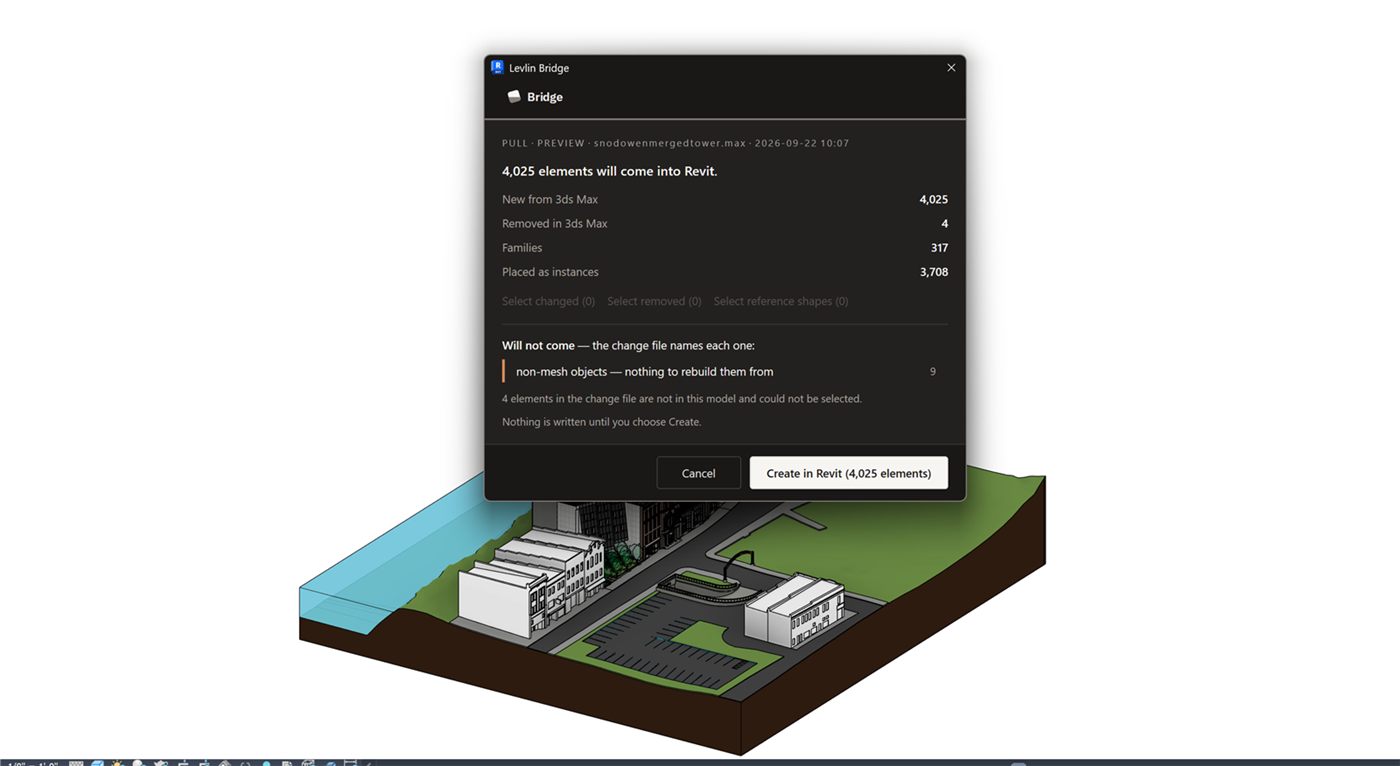
- Pull in Revit.
Each 3ds Max object arrives as its own Mass family, at the correct position and scale. Coplanar triangles are merged into one planar face; cylinders and the other primitives are detected and rebuilt as solid forms; freeform surfaces stay a mesh residual inside the same family, grounded by ten reference planes so they can still be dimensioned and tagged. Instances of one object share one family type. How the solid-or-mesh decision is made.
The 3ds Max materials come with it, colour included: what you see in 3ds Max is what you see in Revit, on every element returned as a Mass. The one exception is the grounded mesh residual — trees and the like, hundreds of thousands of faces, which it would be impractical to rebuild as faces.
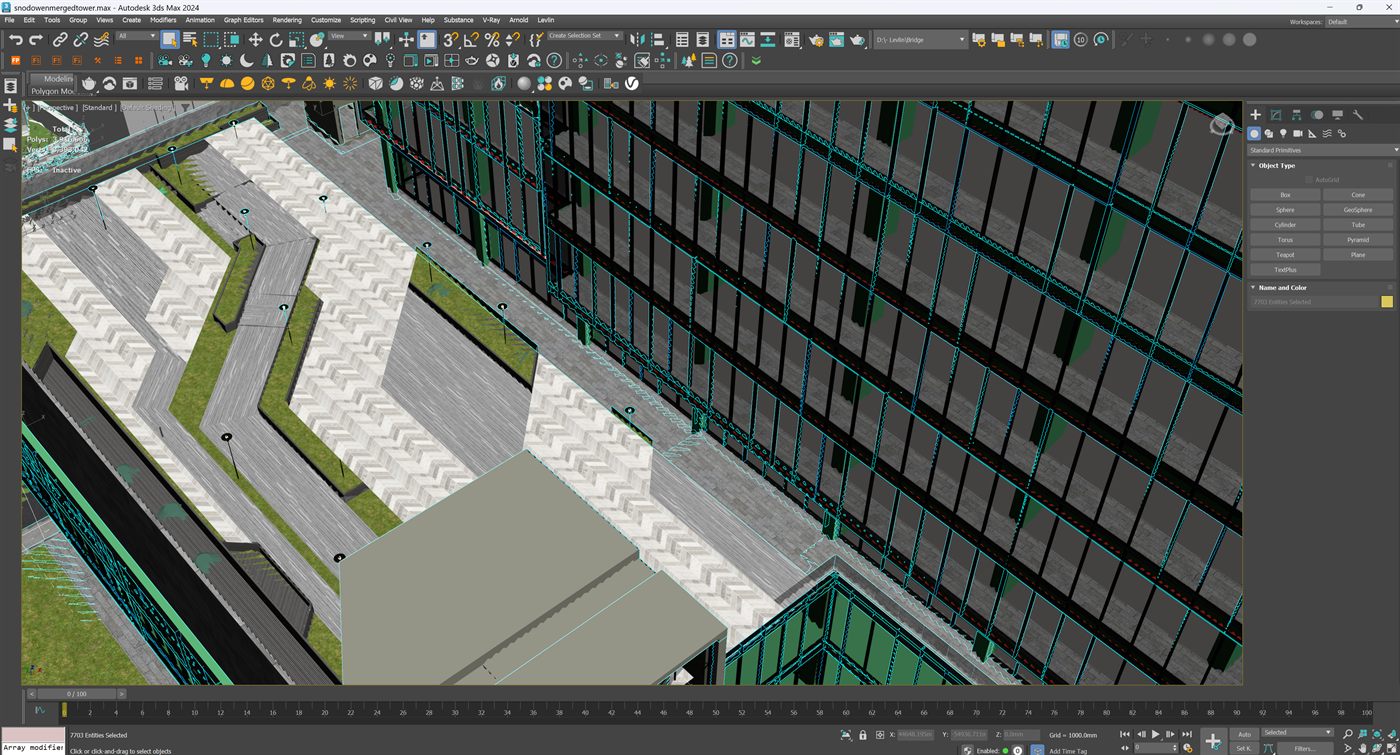
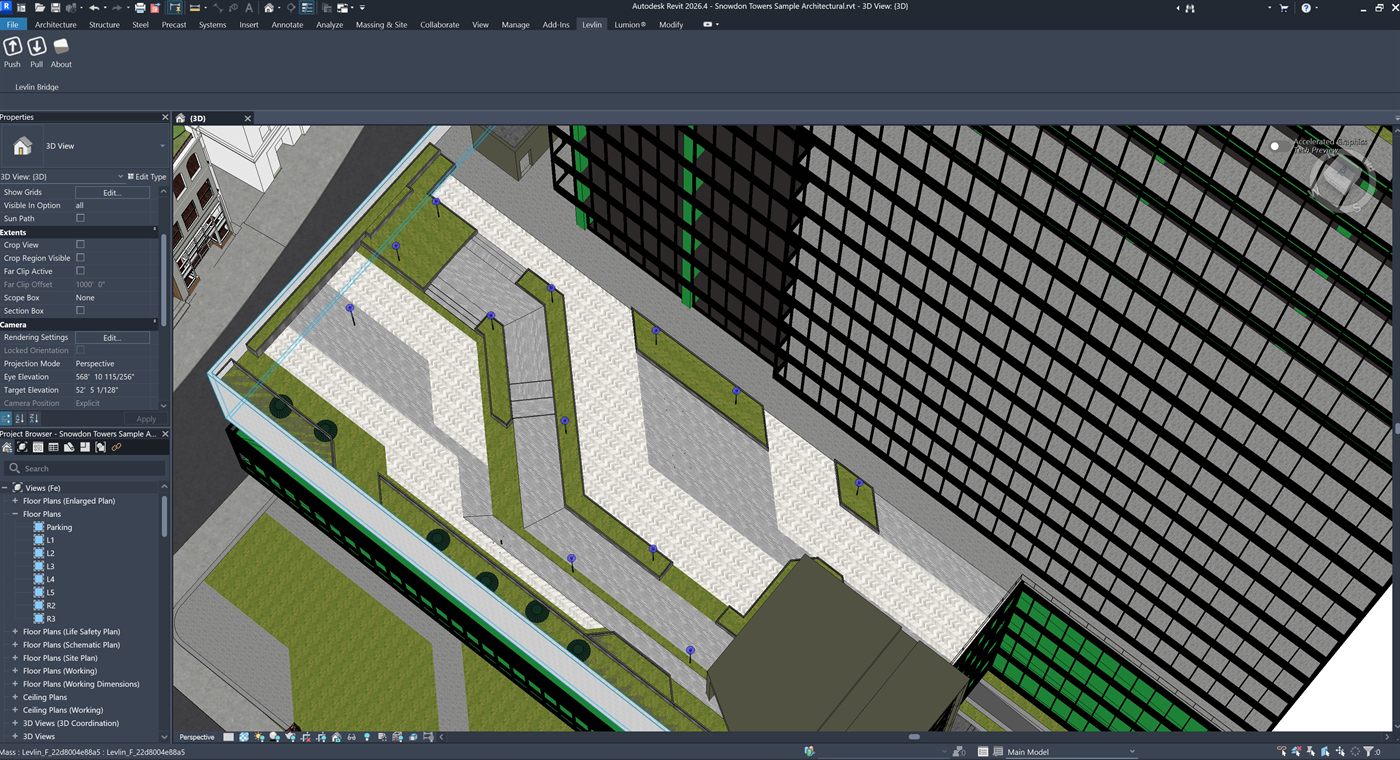
Mass : Levlin_F_22d8004e88a5.Change the model in 3ds Max, push again, pull again: the same ElementId is updated in place, and the dimensions, tags and hosted elements on it stay. What survives a re-pull, measured. Why a Mass family and not a DirectShape.
Side by side
| Autodesk’s route | Levlin Bridge |
|---|---|
| Faceted: every triangle is a face | Coplanar triangles merged; primitives rebuilt as solids |
| Wall by Face on some faces; others inactive | Wall by Face on any solid face |
| One block per file | One Mass family per 3ds Max object; instances share a type |
| Materials by DWG layer, assigned by hand (DWG only) | The 3ds Max materials and colour, on every element returned as a Mass |
| Units and position set by hand on each import | Units set from the Revit project by the first pull; position exact |
| Update = new export, new import, new element | Pull again; the same element updates in place, annotations kept |
| Free, in the box, documented since 2010 | In final testing; not released |
The honest boundary
Route 2 was measured in Revit 2026 with 3ds Max 2024, on mesh objects, groups, instances, render proxies and a SketchUp import. Levlin Bridge is in final testing and is not released; there is nothing to download yet. Route 1 is available today, costs nothing, and for a simple volume imported once it may be all you need. If your model is more than that — many objects, curved primitives, materials that should survive, a design that will change after the first import — that is the case the second route was built for. What the architect can do with the result.
Frequently asked
How do I get a 3ds Max model into Revit as a Mass?
Two ways. Autodesk’s route: export SAT or DWG from 3ds Max, import it into a Conceptual Mass family, load the family. Levlin Bridge: pull once from the Revit project, collapse the objects in 3ds Max, push, pull; each object returns as its own Mass family with real faces and its 3ds Max materials.
Why does Revit pick up every triangle of my imported 3ds Max model?
Because the SAT or DWG export carries the mesh as it is, and Autodesk documents that exported objects are faceted rather than smooth. An import does not merge triangles into faces; Levlin Bridge does, and rebuilds primitives as solids.
Why does Wall by Face or Mass Floors fail on the imported mass?
Autodesk’s help says tessellated approximations of curved surfaces can fail to produce meaningful host elements, and some CAD formats lack the geometry needed for mass floors. Users report inactive faces and intersecting Body Objects for the same reason.
Do the 3ds Max materials come across?
On Autodesk’s route, only by DWG layer, assigned by hand in Object Styles. With Levlin Bridge the 3ds Max materials and their colour return on every element that comes back as a Mass; the grounded mesh residual for freeform geometry such as trees is the exception.
What happens when the 3ds Max model changes?
On Autodesk’s route you export and import again and get a new element; whatever was placed on the old one is lost. With Levlin Bridge you push and pull again and the same ElementId is updated in place, dimensions and tags kept.
Is Levlin Bridge available now?
No. It is in final testing and is not released; there is nothing to download yet. Leave your email on the home page and you get the 30-day trial the day it ships.
Related field notes
- Which 3ds Max import formats can travel on to Revit?
- Blender to Revit: the FBX, OBJ, glTF and USD route through 3ds Max
- Rhino and Grasshopper geometry into Revit through 3ds Max
- How to get a SketchUp model into Revit as measurable elements
- Flat faces vs curved surfaces: what comes back from 3ds Max as a solid Mass, and what stays a mesh
- What can an architect do with a Mass that came back from 3ds Max?
- Do dimensions and tags survive when you pull again from 3ds Max into Revit?
- Why Levlin Bridge returns 3ds Max geometry to Revit as a Mass family, not a DirectShape
- Is there a plug-in that links Revit and 3ds Max in both directions?
- Why the Revit model arrives at the wrong scale in 3ds Max
- Why the Revit model appears twice in 3ds Max after a reload
- 3ds Max cannot link the Revit file? Four causes, in order
- Revit File Link or FBX for 3ds Max?
- Do Revit and 3ds Max versions have to match?
- What happens to deleted Revit elements in 3ds Max?
- Why modifiers and UVW break when a Revit link reloads
- What Combine By Revit Material actually does to your model
- Why “Keep material parameters on reload” doesn’t save your 3ds Max materials
- Does Datasmith move a Revit model into 3ds Max?
- Can Speckle sync Revit and 3ds Max?
- Is NVIDIA Omniverse still a Revit to 3ds Max route in 2026?
Levlin Bridge
Levlin Bridge is a Windows plug-in that moves geometry between Autodesk Revit and Autodesk 3ds Max in both directions. Push the model from Revit, pull it into 3ds Max, and push the geometry you changed back into Revit as real elements. Only the difference ever moves, so materials, modifiers and UVW stay exactly where you left them. Any Revit 2022–2027 works with any 3ds Max 2024–2027.
Levlin Bridge is in final testing and is not released. There is nothing to download yet. Leave your email and you get the 30-day trial the day it ships.